



 English
 русский
 中文
 español
 português
- Pools de minería
- QUANTUS Pool
- Cómo empezar

Pool de QuantusQUANTUS
Nuevo pool Poseidon2
PPLNS
comisión 1% En línea · último bloque
Cómo empezar a minar Quantus
1
Tu billetera Kr
Crea una cuenta para obtener una billetera Kr: una billetera interna para todos los pools. No se puede minar sin una cuenta.
2
Dirección del pool
1
Región el ping se mide desde tu navegador y se elige el más rápido
2
Tu dispositivo
3
Introduce esto en tu minero
URL del pool
stratum+tcp://eu.quantus.k1pool.com:5660
Worker
Kr_WALLET.rig1
Contraseña
x
El usuario es tu billetera Kr. Crea una cuenta para obtenerla; lo que va después del punto es el nombre del rig.
3
 Windows OS: Download the ready-to-use version of miners (archive password: k1pool).
Replace Kr_WALLET in the .bat file with the account address received in Step 1. You can change RIG_NAME; use up to 32 Latin letters, digits, "_" or "-".
Configuración paso a paso
 HiveOS
RGMiner
Linux
./rgminer-1.1.7 --algo quantus --stratum stratum+tcp://eu.quantus.k1pool.com:5660 --wallet Kr_WALLET --worker-name RIG_NAMEWindows
Suprminer
Windows
SRBMiner-MULTI
Windows
BzMiner
Windows
PeakMiner
Windows
Krig Miner
Windows
HiveOS - RGMiner
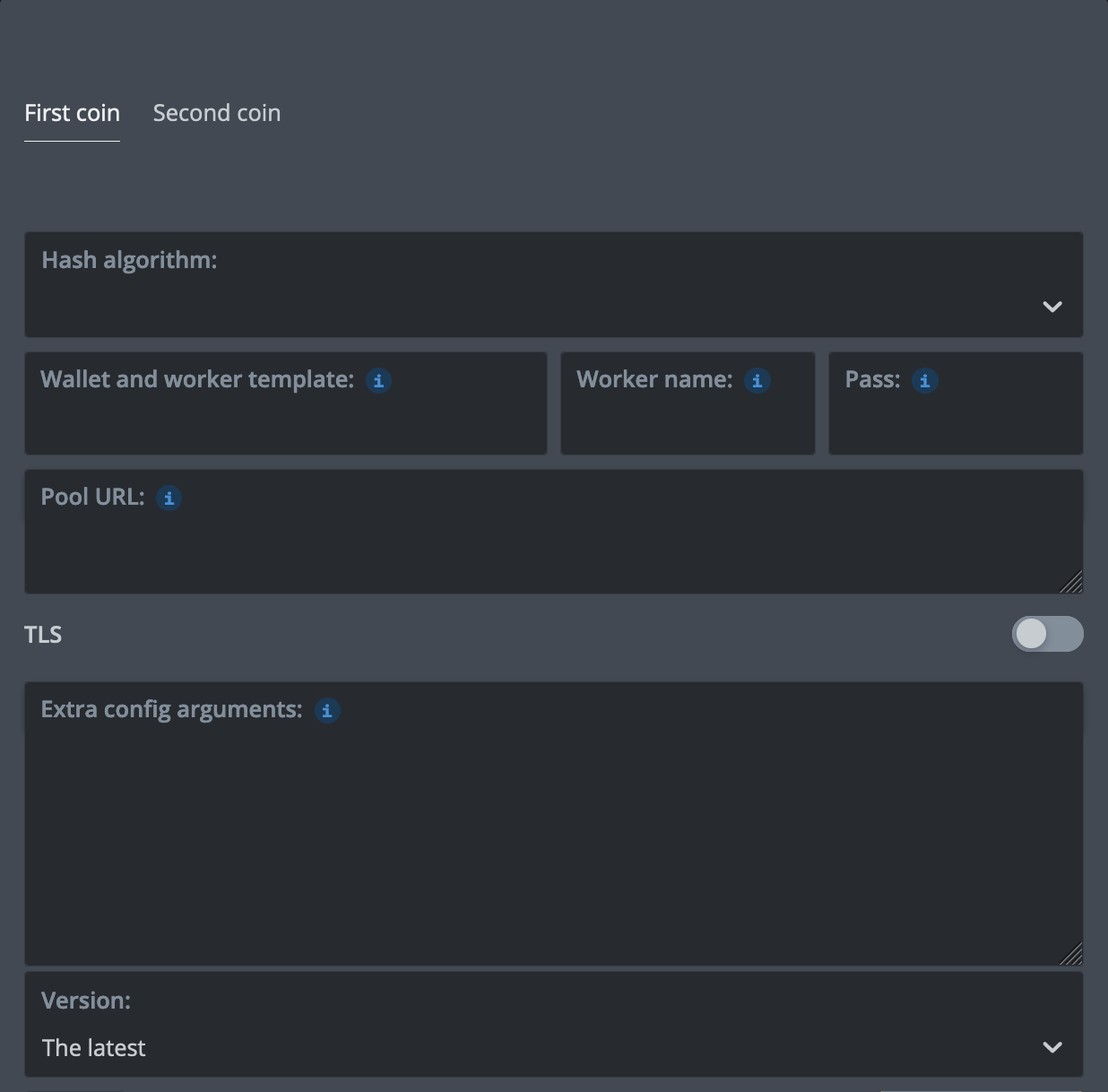
In the Flight Sheet choose Custom miner, then Setup Miner Config: miner name rgminer-1.1.7, set Hash algorithm to quantus, and set the installation URL:
Flight Sheet JSON config
{
    "name": "Quantus RGMiner K1",
    "isFavorite": false,
    "items": [
        {
            "coin": "Quan",
            "pool_ssl": false,
            "dpool_ssl": false,
            "miner": "custom",
            "miner_alt": "rgminer-1.1.7",
            "miner_config": {
                "url": "eu.quantus.k1pool.com:5660",
                "algo": "quantus",
                "miner": "rgminer-1.1.7",
                "template": "%WAL%.%WORKER_NAME%",
                "install_url": "https://github.com/Printscan/rgminer/releases/download/v1.1.7/rgminer-1.1.7-hiveos.tar.gz"
            },
            "pool_geo": []
        }
    ]
}
HiveOS - Suprminer
Flight Sheet JSON config
{
    "name": "QTC suprminer K1",
    "isFavorite": false,
    "items": [
        {
            "coin": "Quan",
            "pool_ssl": false,
            "dpool_ssl": false,
            "miner": "suprminer",
            "miner_alt": "suprminer",
            "miner_config": {
                "url": "eu.quantus.k1pool.com:5660",
                "algo": "quantus",
                "miner": "suprminer",
                "template": "%WAL%.%WORKER_NAME%"
            },
            "pool_geo": []
        }
    ]
}HiveOS - SRBMiner-MULTI
Flight Sheet JSON config
{
    "name": "QTC srbminer K1",
    "isFavorite": false,
    "items": [
        {
            "coin": "Quan",
            "pool_ssl": false,
            "dpool_ssl": false,
            "miner": "srbminer",
            "miner_alt": "srbminer",
            "miner_config": {
                "url": "eu.quantus.k1pool.com:5660",
                "algo": "quantus",
                "miner": "srbminer",
                "template": "%WAL%.%WORKER_NAME%"
            },
            "pool_geo": []
        }
    ]
}HiveOS - BzMiner
HiveOS - PeakMiner
Flight Sheet JSON config
{
    "name": "QTC peakminer K1",
    "isFavorite": false,
    "items": [
        {
            "coin": "Quan",
            "pool_ssl": false,
            "dpool_ssl": false,
            "miner": "peakminer",
            "miner_alt": "peakminer",
            "miner_config": {
                "url": "eu.quantus.k1pool.com:5660",
                "algo": "quantus",
                "miner": "peakminer",
                "template": "%WAL%.%WORKER_NAME%"
            },
            "pool_geo": []
        }
    ]
}HiveOS - Krig Miner
Flight Sheet JSON config
{
    "name": "QTC krig K1",
    "isFavorite": false,
    "items": [
        {
            "coin": "Quan",
            "pool_ssl": false,
            "dpool_ssl": false,
            "miner": "krig-miner",
            "miner_alt": "krig-miner",
            "miner_config": {
                "url": "eu.quantus.k1pool.com:5660",
                "algo": "quantus",
                "miner": "krig-miner",
                "template": "%WAL%.%WORKER_NAME%"
            },
            "pool_geo": []
        }
    ]
}%WAL% - K1Pool wallet Kr_WALLET%URL_HOST%, %URL_PORT% - select K1Pool server in the Flight SheetStep 1 - Register
Step 2 - Download mining software
RGMiner 1.1.7 (NVIDIA, 2% developer fee): GitHub release, website rgminer.net.
- Linux: rgminer-1.1.7, a single file: make it executable with
chmod +x rgminer-1.1.7. - Windows x64: rgminer-1.1.7-windows.zip: run the command above from the unpacked folder, or put the K1Pool server and your Kr wallet into
run_quantus.bat. - HiveOS: the installation URL on the HiveOS tab above.
Windows OS: Download the ready-to-use version of miners (archive password: k1pool).Replace Kr_WALLET in the .bat file with the account address received in Step 1. You can change RIG_NAME; use up to 32 Latin letters, digits, "_" or "-".
Step 3 - Check the mining status
After starting mining, make sure the pool detects your Worker and accepts shares. Check Mis estadísticas. The Worker normally appears as active about 5-10 minutes after the first accepted share.
Chat de soporte en Telegram. No dudes en contactar a nuestro equipo de soporte si tienes alguna pregunta Telegram